
As more people turn to ChatGPT for local recommendations, being visible on Google Maps alone is no longer enough. When users ask for the best store, restaurant, or service provider in a specific city or neighborhood, ChatGPT pulls from a mix of web sources to decide which brands to mention.
For local businesses and multi-location brands, this creates a new challenge. You are no longer just optimizing for rankings. You are optimizing to be understood, trusted, and cited by AI that summarizes the local web.
This article walks through a practical process for influencing how ChatGPT discovers and evaluates content, with a specific focus on local intent. The goal is not to game the system, but to align your content with the sources and signals ChatGPT already relies on when making local recommendations.
What follows is a step-by-step approach to identifying those signals, creating content that matches them, and measuring whether your brand is actually showing up in local AI-generated responses.
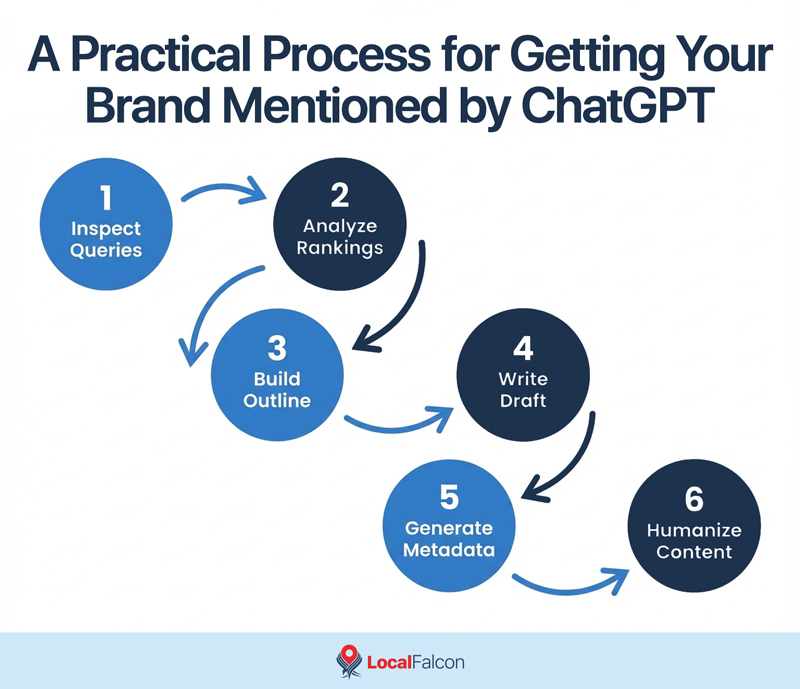
A Practical Process for Getting Your Brand Mentioned by ChatGPT
This approach focuses on understanding what ChatGPT actually looks for, then creating content that clearly matches that intent.
Step 1: See What ChatGPT Is Searching For
Start by uncovering how ChatGPT interprets your prompt behind the scenes.
- Open a new ChatGPT conversation in your browser
- Perform a query that you would like ChatGPT to recommend your brand for.
- Copy everything in the URL that appears after /c/.
- Right-click anywhere on the page and select Inspect.
- Open the Network tab.
- Paste the copied string into the Network filter.
- Refresh the page.
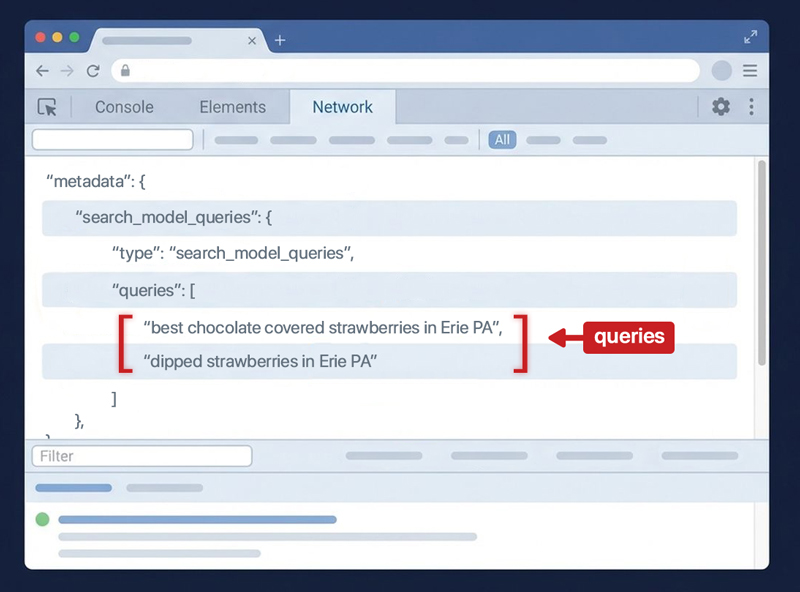
- Click the request highlighted with orange brackets.
- Open Response and search for queries.
These queries show how ChatGPT split your prompt into search-like requests, which, according to ChatGPT stats, are usually 5+ words. This is the closest view you get into what it is trying to understand and verify.
Step 2: Check What Google Ranks for Those Queries
Now look at what the web already considers authoritative.
- Take one of the queries ChatGPT used.
- Search it directly on Google.
- Open the top three organic results.
- Use a tool like the Detailed Chrome extension.
- Go to the Headings section and copy all headings from each page.
It's important to note that the goal here is not copying content, but rather mapping structure and coverage.
Step 3: Build a Better Outline
Now it's time to combine what already works for other brands into something clearer and more complete to get ChatGPT to recommend your brand.
Paste all collected headings into ChatGPT and prompt it something like this:
"My keyword is [ChatGPT search query]. These are headings from the top ranking pages. Create a stronger outline that combines the best parts and fills any gaps.
Keep in mind that your goal is not to create longer content. It's to publish better organized content that AI prefers.
Step 4: Write the Article
Once the outline is set, generate a first draft.
Ask ChatGPT to:
- Write the full article based on the outline
- Start with a short TL;DR (2-3 sentences) that delivers the main takeaway immediately
- Use clear sections and short paragraphs (follow content chunking best practices)
Remember that your goal should always be to answer people's questions directly and clearly.
Step 5: Generate SEO Metadata
After the draft is complete, ask for supporting metadata.
Prompt ChatGPT to:
- Create a page title
- Write a confident meta description
- Suggest a clean URL slug
This saves time and keeps everything aligned with the content.
Step 6: Make It Sound Human
Before publishing, slow down and edit.
- Add real examples or experience
- Include original images or screenshots
- Remove buzzwords and generic phrasing
- Replace anything that sounds like marketing copy
- Double-check tone and clarity
If anything sounds like it could apply to any company, rewrite it and make it more personalized.
How To Check If ChatGPT Mentions Your Brand Locally
Once your article is published and indexed, you can start monitoring whether ChatGPT is actually recommending your brand in local results using Local Falcon.
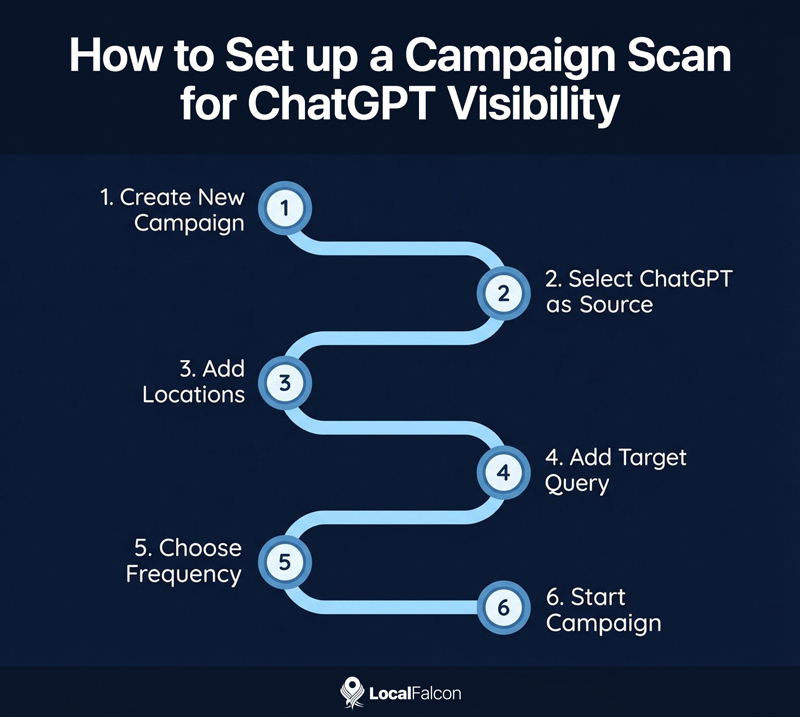
Here's how to set up a Campaign Scan for your target query to track ChatGPT visibility over time.
- Go to Campaign Scan and click Create New Campaign
- Select ChatGPT as the data source
- Add the locations you want to monitor
- Add the query you want ChatGPT to recommend your brand for
- Choose a scan frequency — weekly or bi-weekly works well
- Click Start Campaign
This automates visibility tracking for your target query, making it easier to see how the steps outlined above affect your Share of AI Voice in specific markets.
You can track multiple queries in the same Campaign, which simplifies reporting and helps you compare performance across different services or locations.
For deeper insights, review the individual Scan Report for each query. Pay close attention to the AI analysis and source information sections to understand what ChatGPT is referencing locally.
For example, if ChatGPT consistently cites certain directories or third-party sites, improving your presence on those sources can help increase visibility for that query.
Final Thoughts
Getting ChatGPT to recommend your brand locally is less about tricks and more about clarity. When your content clearly reflects how people search, how Google ranks local information, and how AI evaluates sources, recommendations tend to follow.
By understanding what ChatGPT looks for, creating content that matches local intent, and monitoring visibility at the market level, you can move from guessing to measuring. As local AI search continues to evolve, brands that treat AI visibility as something they can observe and improve (i.e., Share of AI Voice) will have a clear advantage.
