
If you work out of your home or another type of non-public office space, you may be wondering about hiding your address on Google Business Profile and what the implications of doing so are.
In this guide we'll cover everything you need to know about hiding your address on Google Business Profile, including when, why, and how to do it and even how it can impact your local search ranking.
What Types of Businesses Should Hide Their Address on Google Business Profile?
According to Google's service-area business guidelines, any business that delivers services to customers directly and doesn't serve customers from a physical business location should remove their address. This means hybrid businesses, those that provide services at the customer's location but also have a public storefront, should keep their address visible on Google Business Profile.
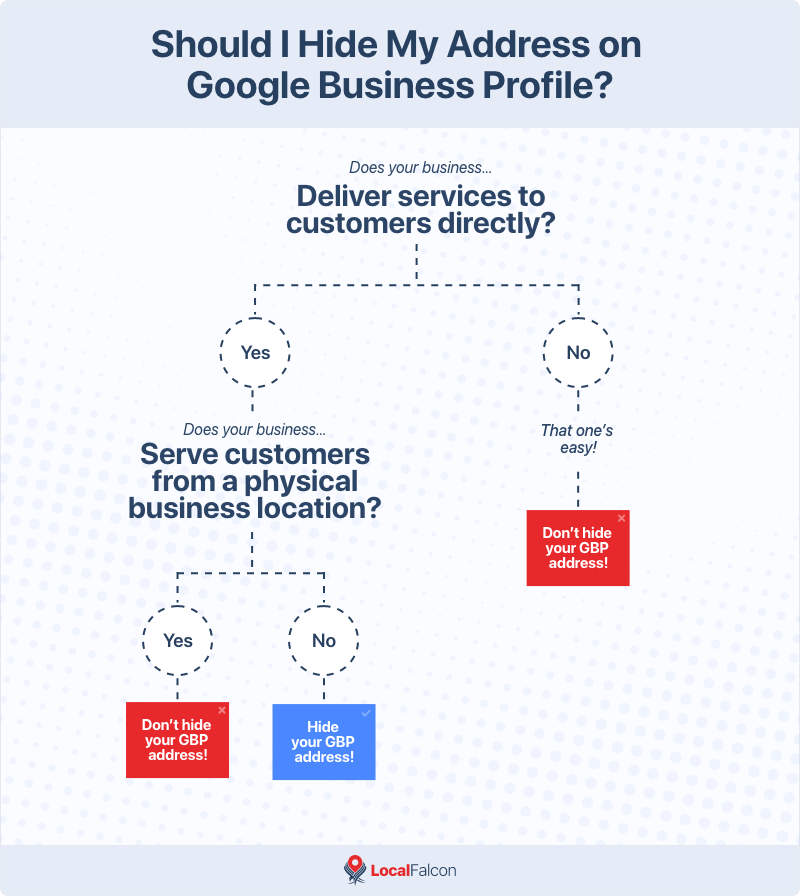
Examples of service-area businesses that should hide their address on Google Business Profile include:
- Plumbers
- HVAC technicians
- Electricians
- Locksmiths
- Mobile auto repair services
- Mobile pet groomers
- House cleaners
- Handymen
- Contractors
- Landscapers and lawn care companies
- Appliance repair technicians
How To Hide Your Address on Google Business Profile
Hiding your address is an important step when setting up a Google Business Profile for a service-area business. Here's how to do it:
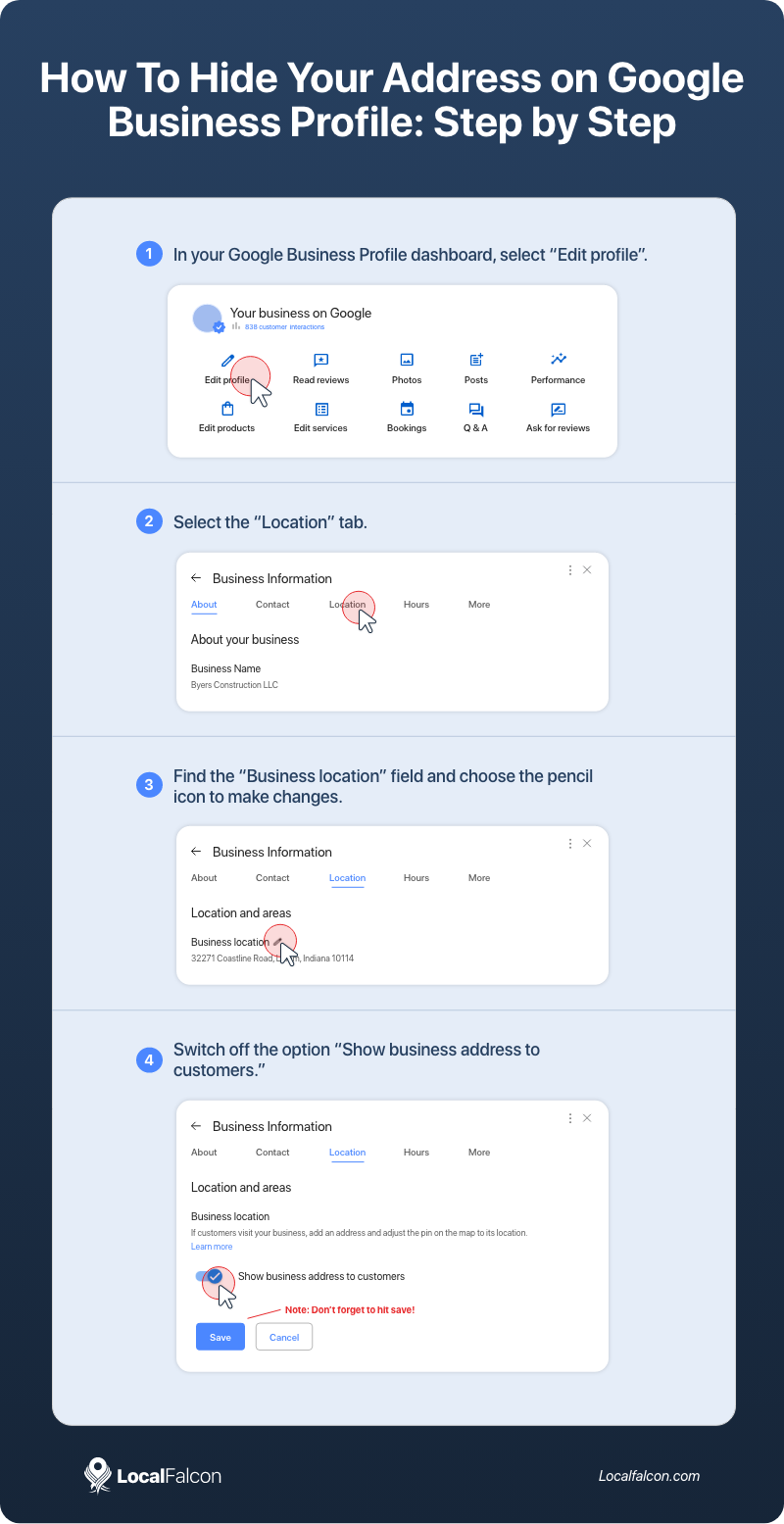
- Open your Google Business Profile dashboard.
- Click "Edit profile," then select the "Location" section.
- Find the "Business location" field and choose the pencil icon to make changes.
- Switch off the option: "Show business address to customers."
- Save your changes.
That's all there is to hiding your business address from your Google Business Profile listing!
What Happens When You Remove Your Address From Google Business Profile?
When you complete the above steps to remove your address from Google Business Profile, Google Search and Maps users will not see an address displayed whenever your business listing appears in local search results (in the local pack in Google Search results or in Google Maps results). This also means there is no map pin (Google Maps location) or driving direction request button for your listing.
So, if there's no address listed for your service-area business, how does Google know when to show it to potential customers? This is where setting your service area comes in. In order to rank in Google's local search results, it's crucial to set all relevant service areas on your Google Business Profile listing. That way, when a user searches for "emergency plumber near me" or "HVAC repair open on weekends," they'll come across your business listing and be more likely to contact you for a service call.
Does Hiding Your Address on Google Business Profile Impact Your Ranking?
While every industry and area is different, it's possible for some businesses to experience a change in their rankings after hiding their address on Google Business Profile, especially if it was previously displayed for a while before removing it.
One test by Sterling Sky showed a significant decline in rankings after removing an address from GBP listings for several businesses. When they added the address back to the profiles, rankings increased again.
Considering that Google's own guidelines state that service-area businesses should hide their addresses on Google Maps, this can put you in a tricky situation. You don't want to go against Google's guidelines, but you also want to maximize local visibility on Google.
The best thing to do to ensure hiding your address from your GBP listing isn't negatively impacting your visibility is to regularly track your Google Business Profile rankings, especially after removing your address or making any other changes to your profile. That way you can correlate changes with ranking fluctuations and look at potential optimizations or workarounds to offset them.
For most service-area businesses, you'll want to keep your address hidden, especially if you work out of your home. However, if you were to notice that removing your address from GBP did negatively impact your rankings, you could consider opening a small public-facing office within your service area, so you could display a local address and boost visibility.
It's unfortunate that Google currently seems to favor businesses with physical locations over service-area businesses with hidden addresses, but if you're strategic about it, you can certainly use it to your advantage to outrank competitors and drive more local business. Just make sure to keep your address hidden unless you have a physical address where customers can actually go.
Final Words
Hiding your address on Google Business Profile is ultimately about accuracy and trust. If you operate as a true service-area business, following Google's guidelines ensures your listing is compliant while still giving you every opportunity to appear in local search results.
It's important to understand that hiding your address doesn't directly act as a ranking factor, but it can influence how Google interprets your proximity to searchers.
Although hidden addresses can sometimes influence GBP rankings, optimizing your service areas and other aspects of your profile and monitoring performance with a local rank tracker, like Local Falcon, will help you maintain strong visibility.
As long as your profile reflects how your business actually serves customers, you'll be well positioned to compete in local search.
FAQs About Hiding Your Address on Google Business Profile
Does hiding my address on GBP hurt my ability to show up in the map pack?
It can in some cases, but it isn't guaranteed. Many service-area businesses rank well without a visible address, especially if their profile is strong and their service areas are set correctly.
Can I still receive reviews if my address is hidden on Google Maps?
Yes. Customers can leave reviews the same way they would for any other business.
Do I have to set a service area after hiding my address on Google Business Profile?
Yes, this is how Google determines where you're eligible to rank. Without an address or service areas, Google has no way to determine your proximity to potential customers.
Can I add my address back to my Google Business Profile later if I open a storefront?
Absolutely. Once you have a public-facing location where customers can visit, you can update your profile to show your address again.
Will hiding my address affect how customers contact me?
No. Your phone number, website, and all other contact options remain visible and fully functional. The only option they won't have is to request directions.
