
You can cancel your Local Falcon subscription at any time from your account dashboard.
1. Go to "Manage Subscriptions"
Visit https://www.localfalcon.com/billing/subscriptions while logged into your account.
2. Click "Cancel Subscription"
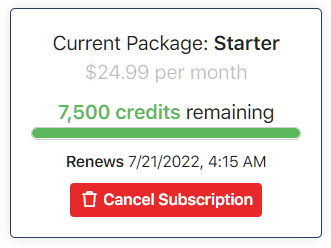
Locate your active credit package and select Cancel Subscription. This will schedule your cancellation for the end of your current billing cycle.
What Happens After Cancellation
-
Your existing monthly credits will remain available until the end of your billing month.
-
Any individual (pay-as-you-go) credits never expire and will stay in your account after your billing month ends.
-
Your account will automatically downgrade to Pay As You Go.
At the end of your billing month, your payment method will stay on file and your account will switch to the Pay As You Go model with no recurring charges. This ensures any auto-scans you've set up can continue running. -
Removing a payment method:
To fully remove a saved payment method, all credit packages must be canceled or already in a canceled state.
An example of what an active subscription looks like on this page is shown below:
Categories:AccountsCredit PackagesPayment Methods
Tags:billingaccount
