
Responding to Google reviews is an essential part of managing any local business's Google Business Profile as part of their overall local SEO and AI visibility strategy.
Whether positive or negative, responding to each and every review builds trust with potential customers and can also help resolve issues that past customers may have experienced, potentially even getting rid of bad GBP reviews by encouraging the customers to edit or delete them.
However, while responding to reviews manually for a single business is fairly manageable, doing so across dozens, hundreds, or thousands of locations quickly becomes impractical.
Luckily, enterprise organizations, multi-location businesses, and agencies that offer local SEO services can automatically reply to Google Reviews using Falcon Agent, Local Falcon's AI agent for local SEO and AI SEO.
Why Automatically Reply To Google Reviews
When it comes to building trust online, replying to reviews is huge. But simply replying isn't enough. Customers increasingly expect fast, personalized responses.
Best practices for effectively replying to Google reviews suggest businesses should aim to reply within 24 to 72 hours.
However, for businesses or agencies managing multiple locations, hitting that window manually is unrealistic without dedicating significant staff time to review monitoring alone. That's where setting up automatic replies to Google reviews comes in, ensuring each and every review left on a location's GBP gets the attention it deserves.
Beyond response time, consistency is a problem. When review responses are handled by multiple people across multiple locations, quality and tone vary. Some reviews get thoughtful replies, others get copy-pasted boilerplate, and some are bound to get ignored entirely. That inconsistency is visible to anyone reading your reviews, and it undermines the impression that review responses are supposed to create.
Automatic replies also protect you from the gap that opens up when staff turnover happens, when someone is out of office, or when review volume spikes after a promotional campaign. Reviews do not stop coming in because your team is stretched thin.
For agencies managing local SEO for clients, automated review responses add a concrete, visible deliverable to your service offering. Clients can see that reviews are being replied to consistently, within a reasonable timeframe, and in a tone that reflects their brand. That kind of accountability is difficult to provide at scale without automation.
How To Automatically Reply To Google Reviews With Falcon Agent: Step-by-Step
Before setting up automatic Google Business Profile review responses, make sure you have connected your Google Account to Local Falcon and imported your locations from that account.
Enabling automatic review responses requires that saved locations are connected via the Google Account import process. You can verify this on the Saved Locations page of your account: locations properly imported from a Google Account will display your Google Account profile picture to the left of the location name. If a location is missing the profile picture, complete the import for that location before proceeding.
Once your locations are connected, there are two ways to set up automatic Google review responses with Falcon Agent:
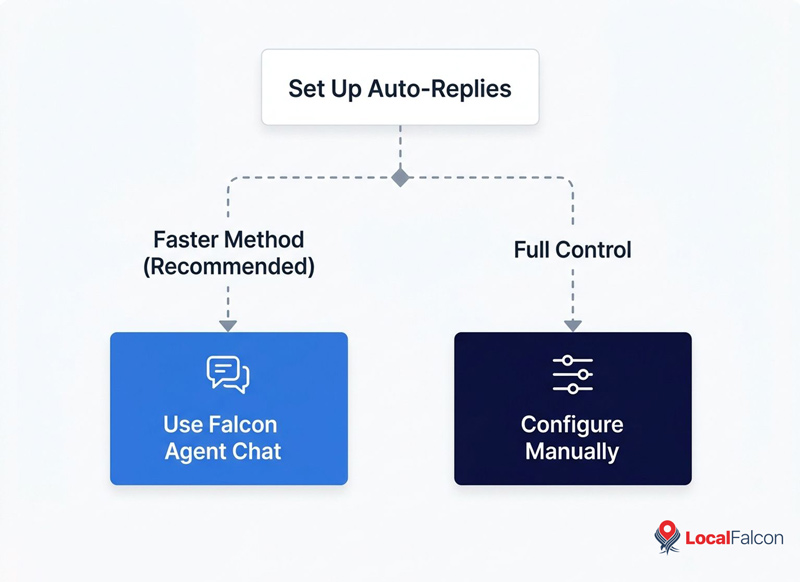
Option 1 (Recommended): Use the Falcon Agent Chat
This is the faster of the two methods and does not require any manual configuration.
- Go to the Falcon Agent chat, accessible from the right-hand side of any page in Local Falcon.
- Type a message asking Falcon Agent to set up automatic review responses. You can name one location or several in the same message, for example: "Set up automatic review responses for [location name]" or "Set up automatic review responses for all [business name] locations."
- Answer Falcon Agent's series of questions to configure the automatic Google review replies, confirm settings and preferences, then configure and enable the automation according to your specifications.
To review, adjust, or manage what Falcon Agent configured, visit the Falcon Agent Settings page.
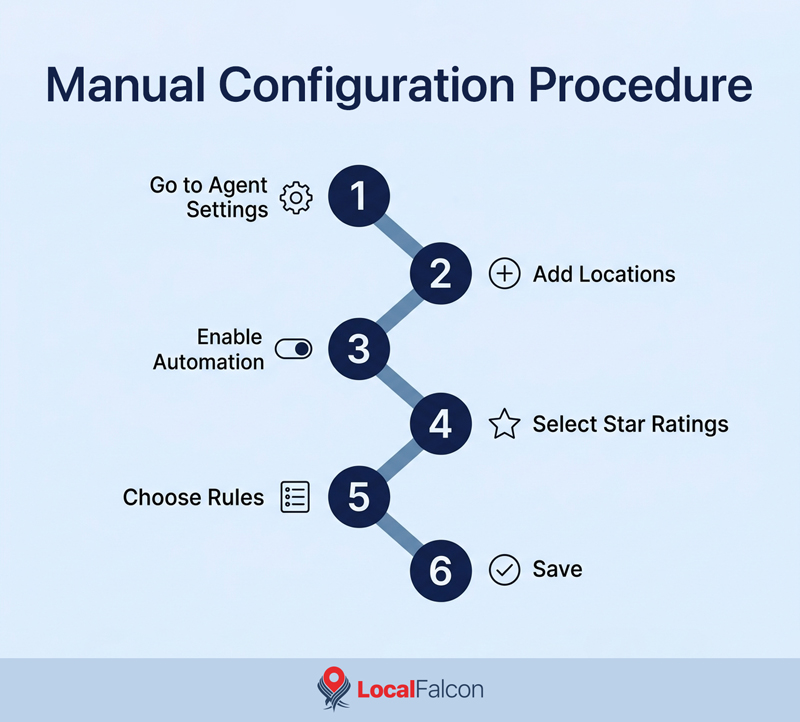
Option 2: Configure Manually via Falcon Agent Settings
This method gives you manual control over every option from the start.
- Go to the Agent Settings page from your Account Settings.
- Use the Add Locations to Agent Monitor dropdown to select one or more locations. The Agent Monitored Locations section will appear once at least one location has been added.
- Enable Automated Review Responses for your locations:
- Single location: Expand the location row and toggle on Automated Review Responses.
- Multiple locations: Check the Select All checkbox, then choose Enable Review Replies from the Bulk Actions dropdown.
- Select which star ratings Falcon Agent should respond to.
- Choose how Falcon Agent should respond:
- Default Rules: Uses your global default instructions, which can be set in the Default Settings panel in the upper-right menu of the Falcon Agent Settings page.
- Custom Rules: Lets you write per-location instructions to tailor the tone, content, or any location-specific details.
- Click Save at the bottom of the page.
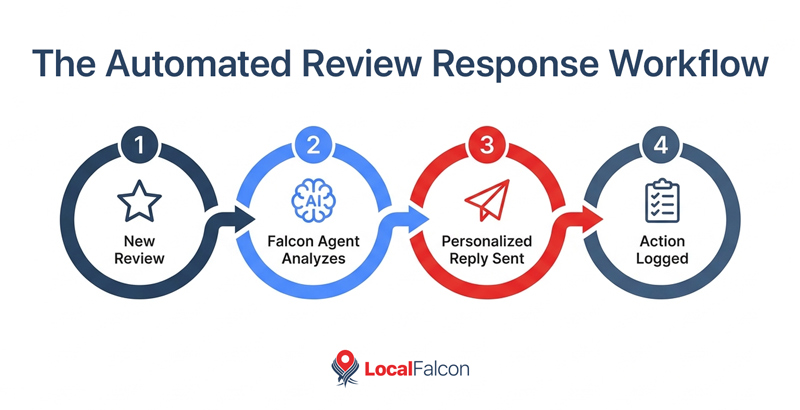
Every automated action Falcon Agent takes is logged in the Activity section at the bottom of the Falcon Agent Settings page, so you can always see what ran, when, and for which location.
Best Practices for Automatically Replying To Google Reviews
Getting a basic Google review response automation live is the easy part, but producing responses that actually serve your brand takes a little more thought upfront. These best practices for automatically replying to Google reviews apply whether you're managing one location or a thousand.
Reply to every review, positive and negative
A lot of businesses prioritize responding to negative reviews and treat positive ones as optional. That is a mistake. Leaving a thoughtful response to a positive review reinforces the customer's decision to leave feedback and signals to prospective customers that you are attentive to the people who support you.
With Falcon Agent running and automatically replying to Google reviews in the background, there is no reason any review should ever go without a reply.
Set different rules for different star rating ranges
Positive and negative reviews need different responses, and you should configure Falcon Agent accordingly. A practical way to segment them is to treat 4-5 stars as positive, 3 stars as neutral, and 1-2 stars as negative. Each tier warrants a different tone, different content, and a different outcome you are trying to achieve.
A 5-star response should thank the customer, reference something specific they mentioned if possible, and invite them back. A 1-star response should acknowledge the issue, apologize, and give the customer a clear path to resolve it offline, typically by providing a direct phone number and asking them to call you.
Lumping all reviews into a single instruction set will produce responses that feel generic across the board (and probably not even make sense in many cases).
Personalize every response where possible
Falcon Agent writes automatic Google review responses based on the instructions you provide, so build personalization into those instructions from the start. Ask it to use the reviewer's name if one is available, reference specific details they mentioned in their review, and avoid generic phrases that could apply to any review for any business.
Responses that reflect what the customer actually wrote feel substantively different from form-letter replies, and that difference registers with anyone reading your profile.
Use per-location custom rules to reflect each location's context
One of the most useful features of Falcon Agent's automatic Google review response setup is the ability to set custom instructions per location rather than applying a single global rule across your entire portfolio. Take advantage of this.
For example, if a location is in a popular neighborhood or near a particular landmark, you may want to mention it in reviews. Locations with a dedicated customer service line should include that contact information in negative review responses, rather than a number for the brand's HQ.
The default response instructions can create a good baseline, but custom per-location rules are where you make responses feel like they actually came from that location.
Set up automations for new locations as soon as they are added
If you are growing, whether as a business adding new storefronts or an agency onboarding new clients, build a process around enabling Falcon Agent's automatic Google review replies for new locations immediately.
A new location without automated review responses can quickly accumulate unanswered reviews during the launch period, and that early review record provides a first impression for potential customers.
Aim for a response window of 24 hours or less
When configuring Falcon Agent to automatically reply to Google reviews, set it up to respond within 24 hours of a new review coming in. In fact, one of the biggest benefits of automating Google review replies with Falcon Agent is that you can ask it to reply faster than any human reasonably could!
For negative reviews especially, a faster response can de-escalate a situation before it affects how other potential customers perceive your business.
Wrapping Up
Responding to every Google review, at every location, and at the speed customers actually expect is not something a manual process can reliably sustain. Fortunately, an AI agent built for local SEO can automatically reply to Google reviews at even the largest enterprise or agency scale.
Falcon Agent handles the execution so your Google review response coverage doesn't become a gap in your local SEO strategy, and so each reply reflects the specific location and situation it is responding to.
FAQs on Automating Google Business Profile Review Responses With Falcon Agent
How long does it take Falcon Agent to reply to a new Google review?
That depends on the response window you configure. Falcon Agent can be set to reply within any timeframe you choose, such as within 1 hour, 2 hours, or longer. As a general best practice, aim for a response window of 24 hours or less.
Can I set different automatic Google review response rules for different locations?
Yes. When configuring automatic GBP review responses in Falcon Agent Settings, each location can be set to use either default settings (your global instructions) or custom rules, which let you write per-location instructions.
How do I know if Falcon Agent's automatic Google review responses are working?
Every action Falcon Agent takes is logged in the Activity section at the bottom of the Falcon Agent Settings page. You can check there at any time to see which reviews were responded to, when, and for which location.
Can I manage automatic review responses for multiple clients from one Local Falcon account?
Yes. Falcon Agent supports multiple locations under a single account, making it well-suited for agencies managing local SEO for multiple clients. You can enable automatic review responses per location, set custom response rules for each one, and monitor all activity from the same Falcon Agent Settings page.
Can I set Falcon Agent to only respond to certain star ratings and ignore others?
Yes. When configuring automatic review responses, you can select which star ratings Falcon Agent should respond to. This lets you, for example, automate responses to 4- and 5-star reviews while handling lower-rated reviews manually, or set up separate automations with different instructions for each rating range.