
Travelers now ask AI platforms like ChatGPT, Gemini, and Google AI Mode where to stay, and the answers name specific properties. Whether or not a hotel is mentioned and recommended in those answers depends on various signals the brand can influence.
Knowing which of those signals to optimize in order to improve AI visibility for hotels requires measuring each location's AI search visibility for a selection of prompts that represent how potential guests actually search.
This guide covers how to track local AI visibility across platforms using Local Falcon, along with what Local Falcon's own research into AI search visibility for hotels says about the sources and signals worth prioritizing.
Why AI Visibility Matters for Hotels
Definition of AI visibility for hotels: How prominently a hotel appears in AI-generated answers, including AI Overviews presented above traditional local search results and conversational answers across various generative AI platforms. This prominence is measured both by Share of AI Voice (SAIV), or how often the hotel is mentioned by AI, as well as rankings, or where it appears in the overall sequence of brand mentions.
Traditional local SEO, focused on earning visibility on Google Search and Maps by earning ranked positions in the local pack, is still important when it comes to driving hotel bookings, but it isn't everything. Hotel brands must now optimize to earn AI visibility to ensure they're reaching potential guests everywhere guests are searching for their next place to stay.
Hotel properties optimized for AI visibility benefit from:
- Higher-converting website traffic
- More direct bookings
- Greater brand awareness
- Stronger reputation
- Reduced dependence on third-party booking sites
- Agentic commerce readiness
What Local Falcon's Research into "Near Me" AI Visibility for Hotels Found
Local Falcon recently completed a study of AI search visibility for hotels across a total of 66,240 AI searches for 998 U.S. hotel locations.
On average, ChatGPT, Gemini, and Google AI Mode named a given hotel in just under 65% of AI-generated responses, compared to including it about 56% of the time in traditional local search results on Google.
Here are a few key findings from the study that hotel marketers should keep in mind while reading through this guide to improving AI search visibility for hotels:
- Wording changes AI-generated results more than traditional local search results: ChatGPT named approximately 73% of hotels for "best hotel near me" and 54% for "best hotels near me." Google Maps results stayed flat at about 56% for each variation.
- Maps visibility does not predict AI visibility: In 620 of the 859 searches where a hotel was missing from Google Maps, at least one AI platform named it.
- Review volume tracks with mentions: ChatGPT named 52% of hotels with fewer than 50 Google reviews and 84% of hotels with 2,500 or more.
- Rating matters up to a point: ChatGPT named around 42% of hotels rated under 3.5 and 71% of those rated 4.0 to 4.4, but mentions stopped rising meaningfully past that threshold.
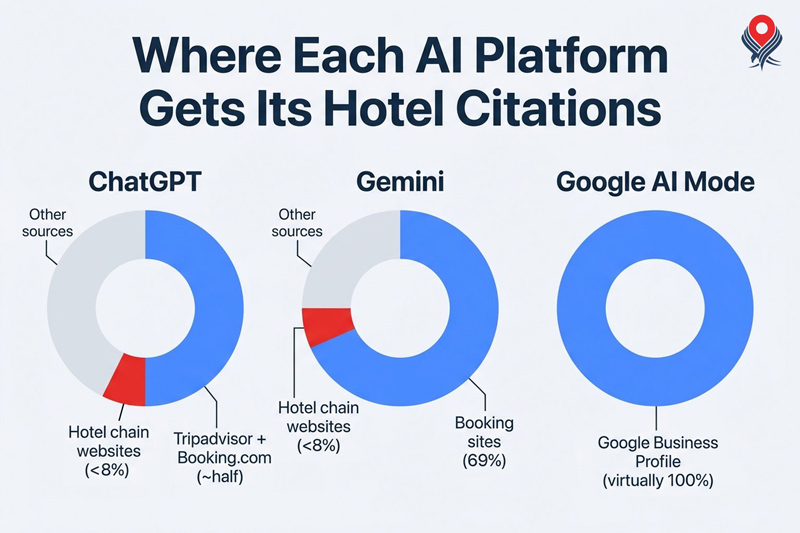
- Third-party booking and review sites dominate citations: Tripadvisor and Booking.com together account for about half of ChatGPT's citations, and booking sites make up 69% of Gemini's. Hotel chain websites account for under 8% for both. Note that Google AI Mode cited Google Business Profile listings virtually 100% of the time.
How To Track Local AI Visibility for Hotels: Step-by-Step
Step 1: Build a List of Prompts To Track
Monitoring every possible AI search term for a hotel would be impossible. A more realistic goal is to track the hotel's AI visibility for a set of terms that is representative of different ways its guests naturally describe what they want.
Start from real data:
- Google Search Console queries
- Booking engine data
- Guest review text (shows the attributes guests mention unprompted)
- Group sales and event inquiries
- Questions your front desk hears repeatedly
- Local Falcon's AI-powered local keyword research tool and suggested keywords feature
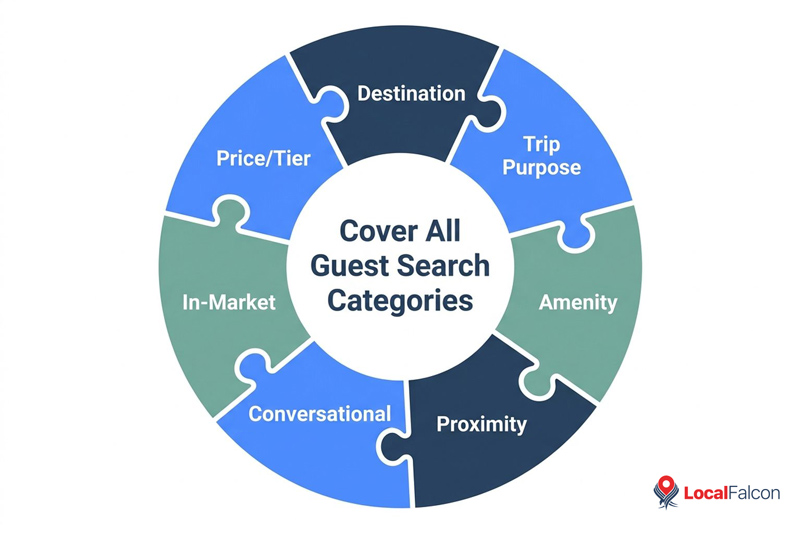
Organize terms into categories to ensure you cover the different ways guests search:
- Destination terms: best hotels in [city], where to stay in [city], best area to stay in [city], hotels in [neighborhood]
- Trip purpose: hotel for a family vacation in [city], where to stay for [event] in [city], hotel for a conference in [city], extended stay hotel in [city]
- Amenity terms, with and without the destination: hotel with a pool in [city], pet friendly hotels in [city], hotel with free breakfast, hotel with EV charging
- Proximity terms: hotel near [airport], hotel close to [convention center], hotel near [hospital], hotel walking distance to [stadium]
- Conversational queries: where should I stay in [city] with kids, what is a good hotel near [venue] for a business trip
- In-market terms: hotel near me, hotels near me, hotel with late check-in, last-minute hotel near me
- Price and tier: affordable hotel in [city], luxury hotel in [city]
Step 2: Track Local AI Visibility on an Ongoing Basis
Use Local Falcon to track local AI visibility for your full list of search terms, starting with a baseline scan, then repeating it on a fixed schedule. You'll typically want to run scans on a weekly to monthly cadence for most hotel portfolios. Results naturally vary between runs and platforms, so focus on trends over time, rather than any set of individual scan results.
Step 3: Find the Gaps
For every tracked term where a property is not named, check that the relevant attribute is stated on the Google Business Profile, the third-party listings, and the property page. For instance, if "hotel with a pool" searches return competitors and not you, confirm the pool is listed everywhere it should be before assuming a content problem.
Step 4: Fix the Sources AI Draws From
The inputs below are the ones most likely to move AI search visibility for hotels, based on what Local Falcon's hotel visibility study found AI platforms cite and mention in responses to "near me" searches:
- Google Business Profile: Google AI Mode cites GBP listings almost exclusively, so this is the main input there. Optimize categories, add all amenities, attributes, and services, write a strong business description, upload photos, keep hours up to date, and respond to reviews.
- Booking and review platform listings: ChatGPT and Gemini lean heavily on these. Keep Tripadvisor, Booking.com, Expedia, and Hotels.com profiles accurate and complete, since a missing amenity or outdated description there can cost you in answers where your own site is not the source.
- Reviews: Review count tracked closely with mentions in the study. Once a property is rated 4.0 or higher, a steady flow of new reviews across Google and the major hotel review platforms is likely worth more than chasing a higher rating.
- Your own website: Hotel sites are a smaller share of citations, so do not rely on the site alone to get a hotel mentioned by AI. Clear information on amenities, location, and nearby attractions keeps your information consistent with what appears on the platforms above.
Destination queries may draw on different sources than "near me" queries, such as destination guides and editorial travel content, so check which sources appear for your destination terms and adjust your listing and content work to match. Local Falcon's local AI visibility Scan Reports include a comprehensive source list of every URL the AI cited across responses.
Step 5: Optimize and Monitor Visibility Trends
When you make an optimization, such as updating listing profiles or running a review campaign, note the date. After the next scheduled scans, compare the Share of AI Voice and other generative engine optimization (GEO) metrics to the previous scans to correlate optimizations with visibility changes.
Local Falcon automatically generates Trend Reports for each combination of location, platform, and keyword, so you can easily see how a hotel's AI search visibility changes over time.
How To Manage AI Visibility Across Multiple Hotel Locations
The steps above work the same for one property or a portfolio, but a hospitality brand with dozens or hundreds of hotels needs to interpret and analyze more visibility data than anyone can review property by property.
Local Falcon's campaigns keep multi-location scans organized: you set a group of keywords that applies to every location, add different location-specific keywords to specific properties, and each campaign generates a Campaign Report for reviewing results across the portfolio, in addition to Scan Reports and Trend Reports for drilling into individual location data.
Final Thoughts on Improving AI Search Visibility for Hotels
AI platforms recommend specific hotels when travelers ask where to stay, and the properties that show up are not necessarily the ones leading on Google Maps.
Tracking a representative set of AI search prompts shows where a hotel is and isn't being named across generative answer engines.
Because results vary between runs and platforms, the trend line matters more than any single scan. Set a baseline, scan on a regular schedule, and log each optimization so you can connect changes in AI search performance to the work behind them.
Using the right GEO tool for the hotel industry makes that record far easier to keep, and Local Falcon's local AI visibility Scan Reports, Trend Reports, and Campaign Reports provide the data needed to track and improve AI visibility for hotel brands, whether they have one property or a full portfolio.