A Google Business Profile audit is the fastest way to find out what's holding a listing back, and it's usually the first thing worth doing before any other local SEO work. The problem is the time it takes. Checking categories, services, hours, reviews, photos, and posts by hand is manageable for one location. Across dozens or hundreds, it becomes a spreadsheet nobody finishes.
Falcon Agent works as a Google Business Profile audit tool for connected locations: it's connected directly to your Google Business Profile and your Local Falcon account, and it can visit your website, so it can compare what your profile says against what your site says.
This guide gives you a Google Business Profile audit checklist and a set of prompts you can customize and run through Falcon Agent to complete a GBP audit for local SEO.
What Is a GBP Audit for Local SEO?
A GBP audit is a structured check of your Google Business Profile's health for local and AI search visibility. It covers completeness (is every field that impacts local rankings and AI visibility filled in), consistency (does the profile match your website), and activity (review recency/velocity, review replies, posts, photos), among other things.
It's important to remember that Google's generative AI search features draw on the same GBP data that powers traditional local results (the local pack and Google Maps rankings), and other AI platforms reference business information found across the web, so gaps and contradictions in a GBP listing can affect whether a business gets recommended across search experiences.
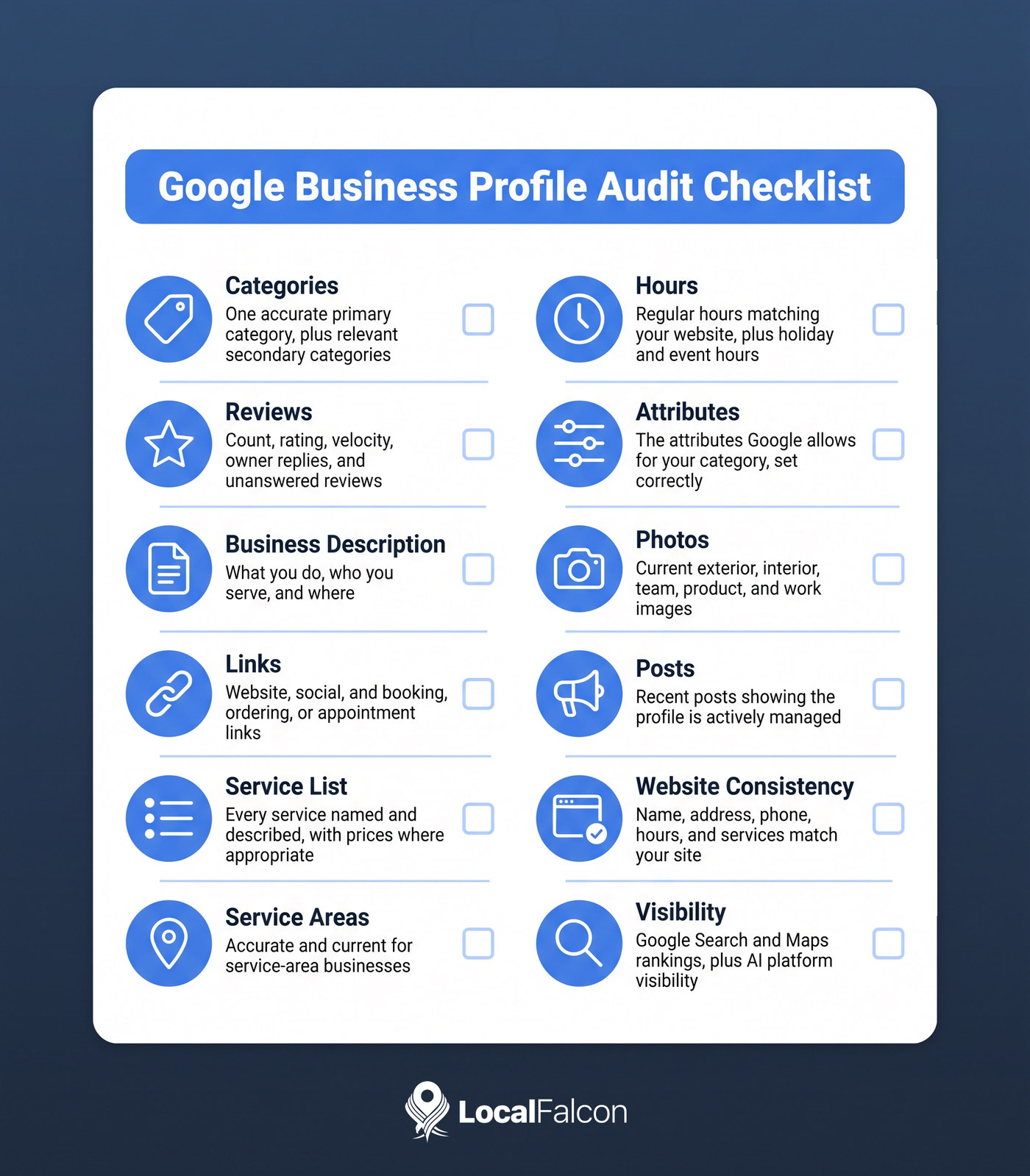
Google Business Profile Audit Checklist
Use this as the baseline for any GBP audit, whether you run it manually or with Falcon Agent.
- Categories: One accurate primary category, plus additional secondary categories that reflect what the business does.
- Reviews: Total count, average rating, review velocity (how steadily new reviews come in), and owner replies, including how many reviews are still unanswered.
- Business description: Detailed, accurate, and written for customers, covering what you do, who you serve, and where.
- Links: Website, social profiles, and booking, ordering, or appointment links where they apply.
- Service list: Every service you offer, named clearly and described, with prices where appropriate.
- Service areas: Accurate and current for service-area businesses.
- Hours: Regular hours that match your website, plus special hours for holidays and events.
- Attributes: The attributes Google allows for your category, set correctly.
- Photos: Enough current, relevant images of the exterior, interior, team, products, and work.
- Posts: Recent posts that show the profile is actively managed.
- Website consistency: Name, address, phone number, hours, and services match your site.
- Visibility: How the location currently ranks on Google Search and Maps and how it appears across AI platforms for its core keywords.
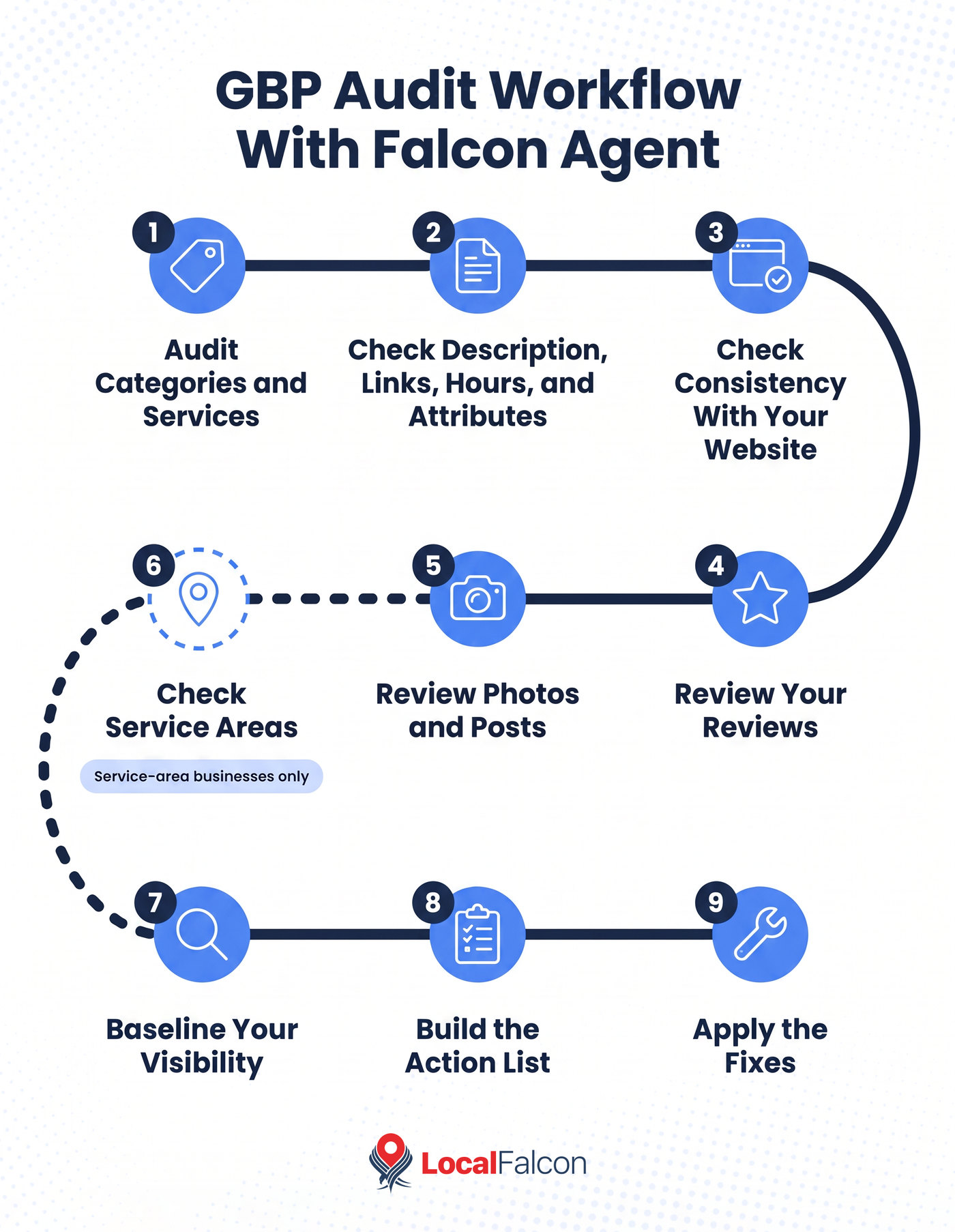
How To Conduct a Google Business Profile Audit With Falcon Agent
Falcon Agent works from natural-language prompts, so the audit is a conversation. Run the prompts below, customizing them as needed, in a single chat, in order, so each step builds on the last.
Before You Start a GBP Audit for Local SEO
Connect your Google account to Local Falcon and import your locations. This is what lets Falcon Agent read all your live profile data instead of only publicly visible information, so do this first for the best results.
Then open Falcon Agent from the sidebar chat, which is available on every page in Local Falcon. Replace the bracketed text in each prompt with your own location, city, and keyword.
Step 1: Audit Categories and Services
Categories and services tell Google what a business is relevant for, so this step is usually where the biggest gaps show up.
Sample prompt: For [location name], show the primary and secondary categories and the full list of services. Tell me which categories and services I don't have that I should add.
Step 2: Check the Description, Links, Hours, and Attributes
Next, check the profile fields that are easy to overlook and easy to get wrong.
Sample prompt: Pull the live profile for [location name] and review the business description, website link, hours, attributes, and any booking, ordering, or appointment links. Flag anything that is missing, thin, or outdated.
Step 3: Check Consistency With Your Website
This is where Falcon Agent's ability to visit your site pays off.
Sample prompt: Visit [website URL] and compare it with the Google Business Profile for [location name]. Flag any differences in business name, address, phone number, hours, and services offered.
Mismatches here are worth fixing quickly. AI platforms and search engines both read your website and your profile, and contradictions between the two make it harder for them to trust either.
Step 4: Review Your Reviews
Reviews affect both rankings and customer decisions, so look at volume, quality, recency, velocity, and responsiveness together.
Sample prompt: Check the Google Business Profile reviews for [location] and report on total reviews, average rating, review recency, review velocity, and reply rate. Then list any reviews that still have no owner response.
If the unanswered list is long, Falcon Agent can draft replies for your approval, or you can set up automatic review responses.
Step 5: Review Photos and Posts
Photos and posts are the easiest parts of a profile to let go stale, and they're also the clearest signal to customers that a business is active.
A profile with a handful of old images and no recent posts looks neglected next to a competitor with fresh photos of its storefront, team, and work. This step shows you what's on the profile and where the gaps are, so you know what to add.
Sample prompt: For [location name], review the photos and posts on the profile. Tell me how many photos there are, which types are missing (exterior, interior, team, products, work), and when the last post was published.
Step 6: Check Service Areas (Service-Area Businesses Only)
If your business travels to customers instead of (or in addition to) welcoming them at an address, your service areas tell Google where you work. Areas that are outdated, too narrow, or listing places you no longer cover can keep you out of searches from customers you want, or bring in inquiries you can't fill.
Skip this step if your business only serves customers at its physical location. Otherwise, use it to confirm the areas on the profile match the cities and regions you actually serve.
Sample prompt: Show the service areas listed for [location name] and tell me whether they match the cities and regions I actually serve: [list areas].
Step 7: Baseline Your Visibility
A Google Business Profile audit tells you what's on the profile. A scan tells you whether it's working. Run a Quick Scan for a core category-related keyword on Google Search/Maps and one for a conversational variation of that keyword across key AI platforms, so you have a starting point to measure fixes against.
Sample prompt: Run a Google Search and Maps ranking scan for "[keyword]" at [location name] and an AI visibility scan for "[AI-style search term]" on [ChatGPT, Gemini, Google AI Mode, or Google AI Overviews]. Summarize how the location performs and which competitors appear most often.
Scans use credits, and Falcon Agent confirms what it's about to run before it does.
Step 8: Build the Action List
Now ask for everything in one place.
Sample prompt: Based on everything above, create a prioritized action list for [location name]. Split it into quick fixes, higher-effort fixes, and items to monitor. Don't change anything yet.
Step 9: Apply the Fixes
Once you've reviewed the list, tell Falcon Agent what to do.
Sample prompt: Apply all the quick fixes from the action list to [location name].
Falcon Agent confirms the details before it makes any change on your listing, and every action is logged in the Activity section of Agent Settings, so you can review what changed and when.
Customizing the Workflow
Falcon Agent is generative AI, and the conversation is fluid. The same prompt can return a slightly different response from one run to the next. Treat the sample prompts as a starting point. If a response is too general, add detail. If it skips something, ask for it directly. If you need a different format, say so.
For example, you can ask for a table, a shorter summary, or a list limited to one issue type. Because each step builds on the last, you can also stop at any point and ask follow-up questions about what Falcon Agent found.
A few ways to adapt the workflow:
- For a single location, run all nine steps once, then repeat the sequence on a regular schedule, such as quarterly, so you can see how the profile changes over time and ensure it remains healthy and active as you track your local and AI search visibility.
- For a multi-location business, name each location in your prompts or ask Falcon Agent to work through a group of locations. In Step 8, ask for the action list to be grouped by issue type (for example, all missing services or all unanswered reviews) so you can fix the same problem across locations at once.
- For agencies, save your customized prompts and reuse them for different clients. The Step 8 action list works well as the first deliverable of a new engagement.
To make the audit recurring, add your locations to Agent Monitor, then create an automated action in Agent Settings with your audit prompts as the instructions and a quarterly schedule.
If you also use Falcon Guard, it monitors your profiles for unwanted changes between audits.
To make your own changes across many profiles at once, see our guide on bulk updating multiple GBP listings with Falcon Agent.
You can also use Falcon Agent to automatically reply to reviews and post on your GBP.
FAQs
How often should I audit my Google Business Profile?
Quarterly works for most businesses. Monthly GBP audits may make sense if you manage many locations or if offerings change frequently.
Do I need to connect my Google account to use Falcon Agent for a GBP audit?
Yes. A connected account gives Falcon Agent access to your live profile data, which makes the audit more complete, as opposed to just telling you what's publicly visible.
Will Falcon Agent change my Google Business Profile without asking?
No. It confirms what it plans to do before it takes an action, and everything it does is logged in Agent Settings.
Can I use this Google Business Profile audit workflow for multiple locations?
Yes. Start with a full inventory of connected locations, then work through the steps for each one, or ask Falcon Agent to tackle groups of locations at once.