
As AI-powered search continues to evolve, businesses can no longer rely solely on traditional keyword tracking to understand their online visibility.
To get a complete picture of how customers find your business, you now need to track your AI visibility alongside traditional rankings. This means monitoring the types of longer-tailed, more conversational queries that are most likely to trigger AI Overviews or generate a list of local recommendations with an AI assistant.
Now that Local Falcon users can track local AI search visibility right alongside Google Maps and Apple Maps rankings, you may be wondering how to find AI-style search terms to monitor.
If you want to measure and improve your AI visibility, you need to track prompts that reflect how real people talk to AI systems. Below are practical ways to identify the right AI-style prompts to monitor.
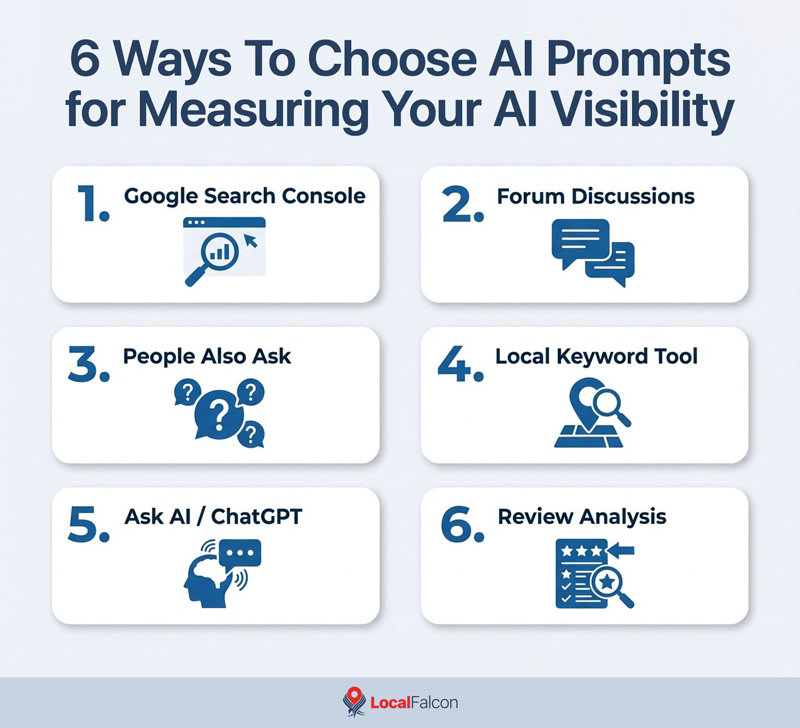
6 Ways To Choose AI Prompts for Measuring Your AI Visibility
1. Look for AI-Style Queries in Google Search Console
As with many things SEO-related, your Google Search Console data is one of the best starting points.
Navigate to the "Search results" report from the "Performance" drop-down and review the queries your site already appears for. Pay special attention to:
- Long-tail queries (5+ words)
- Question-based searches
- Conversational phrasing
- Problem-oriented searches
For example, instead of "roof repair [city]," you might find queries like:
- "how much does roof repair cost in [city]"
- "who fixes storm damaged roofs near me"
- "emergency roof repair after hail storm"
These longer, more natural-language-based queries closely resemble how users interact with AI platforms. AI systems are far more likely to respond with business recommendations to full-context questions, rather than short 2- or 3-word keyword strings.
If you're already getting impressions or clicks for these types of searches, they are excellent candidates to convert into AI prompts for tracking your business's visibility in AI search.
Pro Tip: Filter Google Search Console queries by increasing word count or by including question words like "how," "what," "best," "who," "where," and "why."
2. Check the Questions in Google's "Forums" SERP Section
Google's SERPs often highlight real user discussions from platforms like Reddit, Quora, and Facebook. You can either:
- Click the "Forums" filter at the top of the search results (when available), or
- Scroll down to the "Forums and Discussions" section on the SERP.
These sections surface authentic, unfiltered questions people are asking.
For example, you might see forum-style threads where users ask:
- "Does anyone know a reliable HVAC company in [city] that won't overcharge?"
- "My AC stopped working during the heatwave — who can fix it fast?"
- "Is it better to repair or replace a 15-year-old furnace?"
If people are actively discussing a problem in forums, chances are they'll ask AI about it too. By mining these discussions, you can build a list of AI prompts that reflect genuine user intent, which is exactly what you want to be tracking AI visibility around.
3. Look at Google's "People Also Ask" Section
The "People Also Ask" box is another potential goldmine for AI-style queries. These are real questions Google has identified as highly relevant and frequently searched. They're often structured in full-sentence format, making them perfect models for AI visibility tracking prompts.
For example, if you search "personal injury lawyer [city]," you might see People Also Ask questions like:
- "How much does a personal injury lawyer cost in [city]?"
- "What evidence do you need for a personal injury claim?"
- "When should I hire a personal injury lawyer in [state]?"
Because these questions are based on real user behavior patterns, they provide insight into how people naturally phrase queries. These context-rich questions are increasingly aligned with how AI assistants are being used.
If a People Also Ask question relates directly to your services, category, or geographic area, it's worth adding to your AI visibility tracking keyword list.
4. Use Local Falcon's Local Keyword Research Tool
If you want a more streamlined way to generate AI-style prompts, Local Falcon's Local Keyword Research Tool can help.
Simply enter:
- A target location (by selecting from connected business locations or entering a location manually)
- A seed keyword related to your business categories and services (whatever you want AI to surface you for)
The tool will generate a list of AI-style keyword variations and rank them using Weighted Yield Number (WYN) scoring to help you prioritize which ones matter most in terms of real business opportunity and value.
For example, entering:
- Location: Seattle, WA +
- Seed Keyword: "emergency dentist"
May generate AI visibility prompts like:
- "Who is the best emergency dentist in Seattle for tooth pain?"
- "Where can I find a dentist open now in Seattle, WA?"
- "How much does an emergency dental visit cost in Seattle?"
These variations go beyond traditional short-tail keywords and more accurately mirror the types of questions that trigger AI-generated answers.
Instead of guessing which conversational queries to track, you can rely on data-driven suggestions ranked by opportunity and intent. This allows you to monitor visibility not just for basic service terms, but for nuanced, high-intent prompts that users are more likely to ask AI platforms.
Pro Tip: Just click the "+" sign next to any keywords you want to monitor to build a list, then hit "Run Quick Scan" or "Add to Campaign" to start tracking your AI visibility for those on the spot, without ever switching platforms or toggling back and forth between screens!
5. Ask AI To Generate Prompts Around Specific Pages
You can also use generative AI to help you think like AI users.
For example, you might prompt ChatGPT with:
"What are some conversational queries people might use that would make ChatGPT or other AI platforms surface the emergency plumbing page on my business website?"
The AI can then generate theoretical prompts such as:
- "Who do I call for a burst pipe emergency in [city]?"
- "Is there a plumber open 24/7 near me for a broken water line?"
- "Water is leaking through my ceiling — is that a plumbing emergency?"
While these are theoretical, they are grounded in how people naturally ask AI for help.
You can refine further by adding:
- Location-specific modifiers
- Service-specific details
- Pain-point-driven language
This approach gives you a starting list of realistic, conversation-style prompts tied directly to the page you're trying to promote. It's especially useful when you're building visibility for a new service page that doesn't yet have much search data to work from.
6. Analyze Review Sentiment for Customer Problems
Customer reviews are one of the most underutilized sources of AI prompt inspiration.
Reviews contain natural language that describes:
- Pain points
- Urgency
- Emotions
- Outcomes
- Specific service scenarios
Using a tool like Local Falcon's AI Reviews Analysis Tool, you can rapidly analyze review sentiment and identify recurring themes.
For example, a roofing company review might say:
"They helped us navigate the insurance claim after storm damage and had our roof replaced within a week."
That single sentence can inspire multiple AI-style prompts:
- "Roofing company that works with insurance after storm damage."
- "Who can replace my roof quickly after a hail storm?"
- "Best contractor for storm damage roof repair near me?"
Similarly, an auto repair review might say:
"They diagnosed the issue fast and had my car running again the same day."
That could lead to tracking AI prompts like:
- "Find a mechanic near me who offers same-day car repair."
- "Auto shops that can quickly diagnose engine problems."
Reviews reflect real-world language — not marketing language. AI platforms are trained to interpret and respond to this type of natural phrasing.
Aligning your tracked AI visibility prompts with the way customers describe their experiences improves your ability to measure visibility where it truly matters: problem-based discovery that leads to conversions.
Why Tracking Local Visibility for AI Prompts Matters
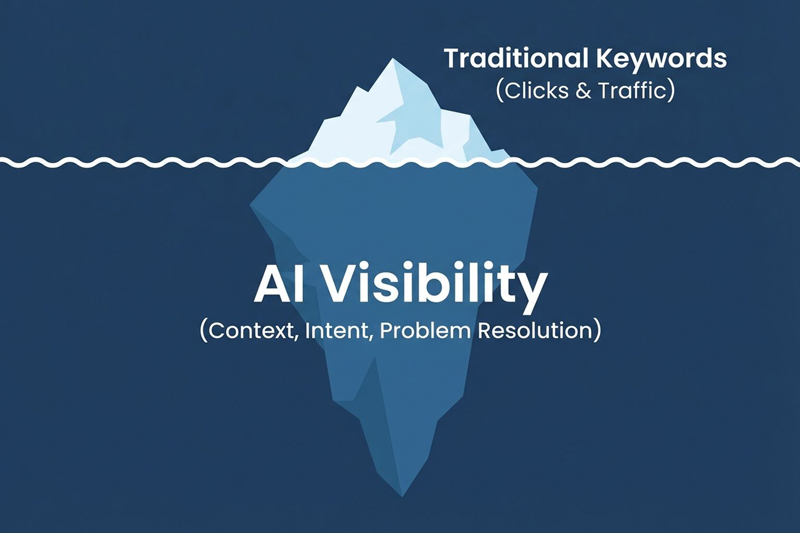
Traditionally, local SEO has focused heavily on short, high-volume keywords that drive clicks, calls, and traffic. But AI search is shifting visibility toward:
- Conversational intent
- Context-rich queries
- Multi-factor decision prompts
- Specific problem resolution
Identifying and monitoring AI-style prompts provides insight into:
- Whether AI systems surface your business
- How you compare to competitors in AI-generated responses
- Where content or reputation gaps may exist
- What real-world customer needs are driving discovery
In short, AI visibility is becoming a new performance layer, sitting alongside traditional rankings but requiring a more human-centered visibility tracking strategy.
Final Thoughts
Finding AI search prompts to track your AI visibility involves studying how real people ask real questions (prompt engineering) and monitoring whether your business appears in AI-generated answers that those queries trigger.
Here's a summary of the methods we discussed above:
- Google Search Console data
- Forum discussions
- "People Also Ask" questions
- Local Falcon's Local Keyword Tool
- AI-assisted brainstorming
- Review sentiment analysis
Leveraging some or all of these tools can help you build a robust list of AI-style prompts that accurately reflect modern search behavior.
Keep in mind that AI-generated search results are highly variable from one minute to the next, but tracking visibility for a healthy variety of AI prompts lets you understand your Share of AI Voice (SAIV), or how often your business is surfaced by AI.
You can then compare this to your competitors and optimize towards a higher SAIV, ultimately ensuring you're more visible across the broad spectrum of where AI can potentially mention your business and others like it.
