
A growing share of the traffic hitting local business websites isn't human. AI agents comparing product and service providers, booking appointments, and even completing purchases on behalf of customers are becoming a normal part of how people discover and choose local businesses.
According to data from Cloudflare Radar, reported on by Search Engine Journal, automated requests to HTML content now outnumber human requests, and a growing portion of that automated traffic is agents acting on a real person's behalf, not scrapers.
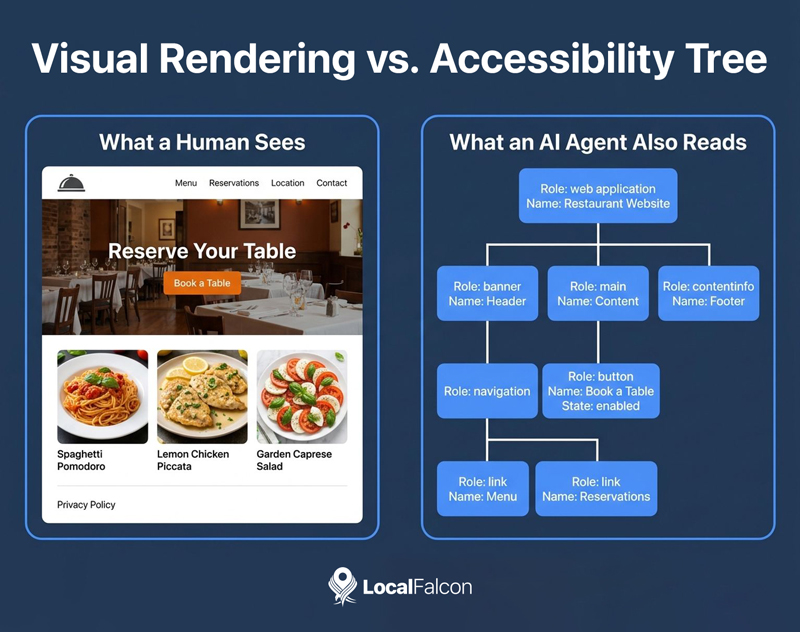
These agents don't browse business sites the way a person does. While they can and do analyze visual renderings, they also rely heavily on a structure many business owners have never even heard of: the accessibility tree.
Understanding what the accessibility tree is and how agents use it, and making sure your site's accessibility tree is optimized for agentic search, is quickly becoming as important for local search as having a mobile-friendly site or a claimed and optimized Google Business Profile.
What Is the Accessibility Tree?
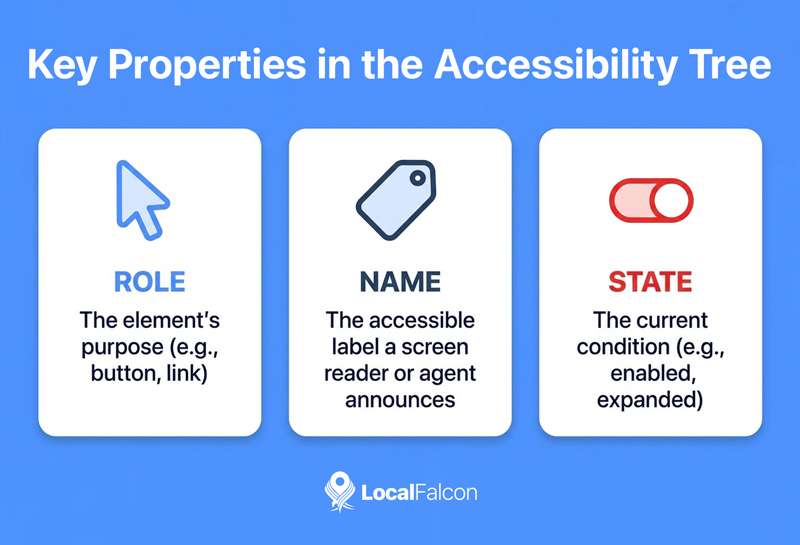
The accessibility tree is a browser-generated model of a webpage, built from the same code (the DOM) that produces what a person sees on screen. Instead of rendering visuals, it strips a page down to a simplified structure of roles, names, and states (e.g., this is a button, it's labeled "Book Now," and it's currently enabled and clickable).
The accessibility tree was originally built for assistive technology. Screen readers, voice control software, and other tools people with visual or motor impairments rely on don't read a page visually. They read the accessibility tree, which tells them what's on the page and what can be done with it. An accurately-labeled form field or a properly marked-up button has been a basic accessibility requirement for years, long before AI agents entered the picture.
What's changed is who else is reading that tree. The same structure built to serve screen reader users is now one of the primary ways AI agents interpret a page, because it gives them a clean, compact summary of what matters instead of a wall of visual and structural noise.
How AI Agents Use the Accessibility Tree
Google has been explicit about this in its own documentation. In its guidance on optimizing websites for generative AI features in Search, Google describes agentic experiences directly, noting that browser agents may access a site to gather what they need to complete a task, including by analyzing visual renderings like screenshots, inspecting the DOM, and interpreting the accessibility tree.
Google's developer guide on building agent-friendly websites goes further, explaining why the tree matters so much to a machine. It describes the accessibility tree as a browser-native structure that distills the DOM into what's most important: roles, names, and states of interactive elements.
The guide calls the accessibility tree the page's "semantic summary," and notes that for an AI agent it functions as a high-fidelity map that ignores the visual noise of CSS to focus on pure utility. By reading that tree, an agent can determine the functional intent of a toggle, a slider, or an input field without needing to visually interpret the page at all.
OpenAI has published similar guidance for ChatGPT Agent in Atlas, telling publishers that the browser uses ARIA tags, the same labels and roles that support screen readers, to interpret page structure and interactive elements. This points to a broader pattern rather than a single company's preference.
Why This Matters for Local Businesses
Agentic commerce is moving quickly from a novel concept to a default option. Booking a hotel, scheduling a service call, reserving a table at a restaurant, or checking real-time availability are exactly the kinds of tasks people are starting to hand off to an agent instead of doing themselves.
For a local business, that means a customer's AI agent may be the one actually navigating your site, filling out your contact form, or attempting to complete a booking flow, well before a human ever sees the confirmation.
Google has even been building its own search agents and expanding agentic booking capabilities directly inside Search and Gemini. When those agents evaluate a local business, whether the task is checking hours, comparing services, or completing a booking, the accessibility tree is one of the primary sources they draw from.
If your site's accessibility tree is incomplete or broken, an agent can hit a dead end even when a human visitor wouldn't necessarily notice a problem at all. A booking button with no accessible name, a date picker an agent can't interpret, or a contact form with unlabeled fields can quietly remove a local business from consideration in an agent-driven transaction, regardless of how the page looks or how well it ranks in traditional search.
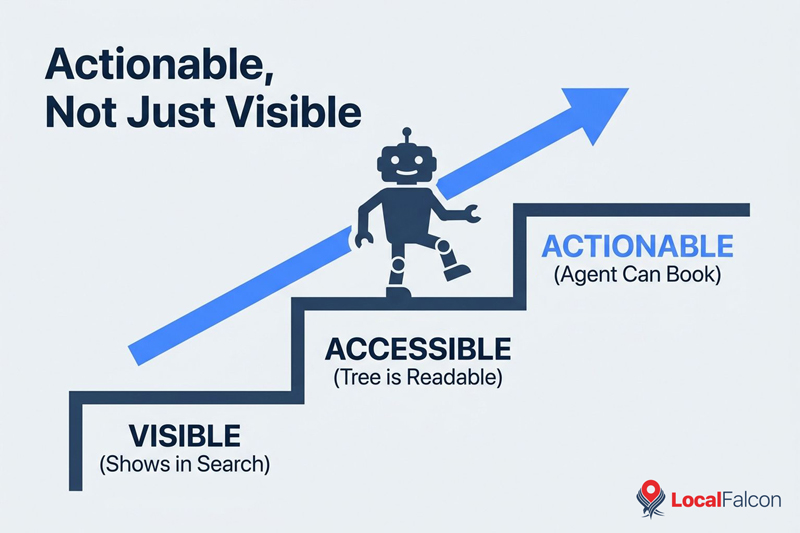
This is a visibility issue as much as a technical one. A business that shows up in an AI-generated local recommendation but can't be booked by the agent that found it loses the conversion anyway.
How Local Businesses Can Optimize the Accessibility Tree for Agents
Optimizing an accessibility tree for agentic search doesn't require a full redesign of your local business site.
Each of the fixes outlined below maps directly to something the accessibility tree exposes to AI agents, whether that's a role, a name, a state, or whether a node exists in the tree at all.
Most of the work is markup-level and can be done page by page, starting with the pages that matter most for local agentic searches: booking forms, contact pages, service listings, and product or menu pages.
Use Native HTML Elements for Native Behavior
A real button element is automatically exposed in the accessibility tree with a role. A div styled to look like a button and wired up with a click handler is not, and an agent has no reliable way to know it's interactive. The same applies to links, form fields, and dropdown menus. Native elements should be the default.
Label Every Interactive Element
This is the tree's "name" property in practice. Every form field needs a real, associated label, not just placeholder text. Every link and button needs accessible text that describes what it does, including icon-only buttons like a phone icon that triggers a call. An empty link or an unlabeled button shows up in the tree as a role with no name, a dead end for both a screen reader user and an AI agent.
Make Sure Key Content Actually Renders
If pricing, availability, or a primary call-to-action only appears after client-side JavaScript runs, there may be no DOM node for the browser to build a tree node from in time. Server-rendering the content that matters most for a transaction reduces the risk that an agent misses it entirely.
Use ARIA Sparingly and Correctly
ARIA attributes write directly into the tree's role, name, and state values. They exist to fill gaps native HTML can't express on its own, not to patch over markup that should have been built correctly in the first place. Adding ARIA roles to elements that already have the right semantics, or applying them incorrectly, inserts inaccurate information into the tree an agent treats as ground truth.
Test What AI Agents Can See
Every modern browser lets you inspect the accessibility tree directly. In Chrome DevTools, the Accessibility panel shows the computed role, name, and state for any element, and a full-page accessibility tree view is available as well. Running this check on a booking form, a contact page, or a menu page takes a few minutes and will surface unlabeled buttons and empty links immediately.
FAQs
Is the accessibility tree the same as web accessibility compliance?
No, but they're closely related. Accessibility compliance is a broader legal and design standard. The accessibility tree is the specific structure a browser generates from your markup, and it's what both assistive technology and AI agents read to understand your website.
Do I need a separate version of my site for AI agents?
No. The accessibility tree is generated automatically from your existing page. A markdown copy or a separate "agent-friendly" version of a page can help an agent read your content, but it can't tell an agent that a button is clickable or that a form field is required. Fixing the underlying markup serves both audiences at once.
Will this affect my local rankings or AI search visibility?
Not directly. Local rankings and AI visibility are still driven by the usual signals, but usability is becoming a separate problem in agent-driven search. An agent can surface your business in a recommendation and then fail to complete a booking on your site because of broken markup. Fixing the accessibility tree for agentic search helps make sure the visibility you already have actually converts.
Does this require a developer?
For most fixes, yes, but they're typically small, targeted changes rather than a full site rebuild. Labeling form fields, fixing empty buttons, and swapping a styled div for a real button are common examples that don't require touching the overall site structure.
Final Words
As agentic booking and local commerce become more common, having an agent-optimized accessibility tree is turning into a core business requirement rather than a niche technical concern.
Local businesses that clean up their markup now are positioning themselves to be actionable, not just visible, across agent-driven local search and booking experiences.