
Local Falcon's ChatGPT visibility tracking lets you see whether your business is mentioned in local results generated by OpenAI's ChatGPT. As AI-powered assistants become more influential in search behavior, tracking your brand's presence in ChatGPT is key to staying ahead of your competitors.
ChatGPT responses often draw from review platforms, business directories, websites, and forums to provide users with local business information. With Local Falcon, you can scan across a geo-grid using natural, local-intent keywords and see whether your business is showing up in AI-generated results, which competitors are appearing, and what sources ChatGPT is citing in responses.
Running a Quick Scan for ChatGPT Visibility
- Log in to your Local Falcon account
- Go to localfalcon.com and sign in using your credentials.
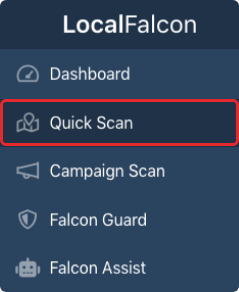
- Go to "Quick Scan" from your Dashboard
- You'll find this in the main navigation. Quick Scans let you run real-time local AI visibility scans on demand.
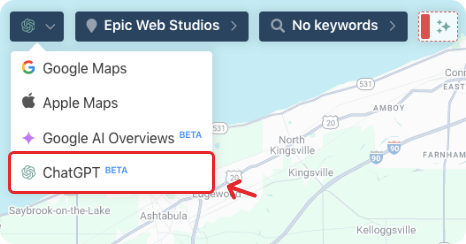
- Select "ChatGPT" from the data source drop-down
- Look in the top left corner of the scan map interface.
- This is where you choose the platform to scan: Google Business Profile, Apple Business Connect, Google AI Overviews, ChatGPT, etc.
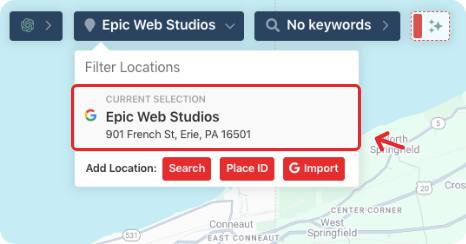
- Choose the business location you want to scan
- You can select from saved locations or import a new one using your connected Google Account.
- Add keywords
- Enter longer, more natural-sounding search phrases that people might use when asking ChatGPT for local recommendations and information.
- These tend to be conversational and context-rich.
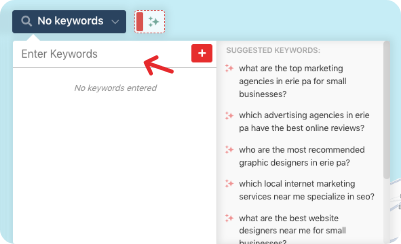
Here are a few examples of the types of keywords that may trigger ChatGPT local results:
- "Who's the top-rated plumber in [Neighborhood]?"
- "What are some good places for a couples massage near Downtown [City]?"
- "What's the best nail salon that's open late in [City]?"
- "Are there any vegan cafés with free wifi in West [City]?"
Tip: ChatGPT is more likely to respond with specific business recommendations if the question includes clear local intent and decision-making language (e.g., "best," "affordable," "open right now").
- Adjust scan settings (optional)
- Choose your preferred grid size and scan radius.
- This controls how wide the search area is and how many points on the map will be tested.

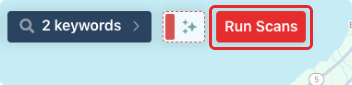
- Click "Run Scan"
- Once configured, click the "Run Scan" button to start generating your ChatGPT visibility Scan Report.
- Results may take several seconds to several minutes, depending on the grid size, number of keywords, and other factors.
- View your Scan Report
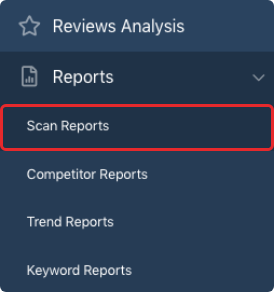
- Once complete, navigate to your Scan Reports dashboard and open the new report to view your fresh ChatGPT visibility data.
Reading a ChatGPT Scan Report
Each ChatGPT scan provides a visual and metric-based summary of how your business is performing in these AI-generated search responses. Like with Google AI Overviews visibility tracking reports, you'll see detailed information broken down into four main sections:
ChatGPT Visibility Metrics
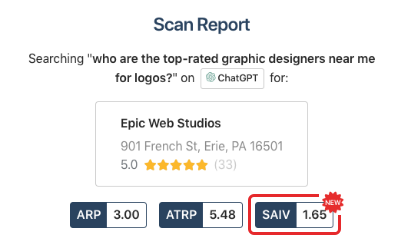
At the top of the scan report, you'll find three key performance metrics:
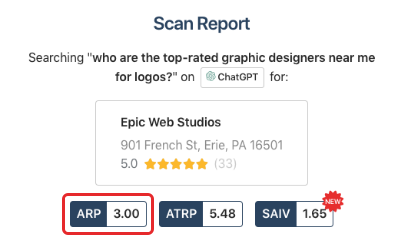
- Average Rank Position (ARP)
- The average "ranking" (sequence your brand was mentioned in) of your business, only on grid points where you were mentioned in a ChatGPT response.
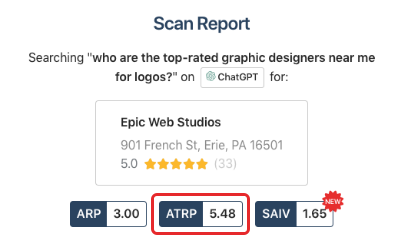
- Average Total Rank Position (ATRP)
- The average ranking of your business across all scanned grid points, whether you were mentioned or not.
- Share of AI Voice (SAIV)
- A Local Falcon-exclusive metric that shows how often your business was included in ChatGPT responses that listed brand names, across the scan grid.
- A SAIV score of 100 means your business was mentioned in every AI result where brand names were included.
- A SAIV score of 0 means you were never mentioned.
- Points where no brands were listed in the ChatGPT result are excluded from the score.
4. Buyer Persuasion Score (BPS): Measures how persuasively ChatGPT recommends — or dissuades potential customers from choosing — your business, on a scale from -10 (strongly recommends against) to +10 (strongly recommends).
Together, these metrics let you track performance over time, compare against competitors, and identify opportunities for content or reputation improvements that could increase your brand's visibility in ChatGPT.
Scan Explorer (Geo-Grid Heat Map)
Below the metrics, you'll find the familiar Local Falcon Scan Explorer (interactive geo-grid heatmap interface). Each pin represents a point on the geo-grid where the given keyword was tested. Colors indicate visibility status:
- Green Pins (🟢): Your business was mentioned in ChatGPT's response. The number inside the pin shows your position in the list.
- Red Pins (🔴): ChatGPT provided a business-related answer, but your business was not included.
- Gray "No" Symbols (🚫): No ChatGPT business result was generated at this point (e.g., ChatGPT responded with a general answer or couldn't provide one).
Clicking any green or red pin will open a detailed view showing:
- The full ChatGPT response for that query/location.
- A list of mentioned businesses and their order.
- Any citations or sources ChatGPT referenced, if applicable.
Falcon AI Report Analysis
This section provides an AI-generated analysis of your overall ChatGPT visibility report, summarizing how your business is being represented in ChatGPT responses. It highlights patterns in how ChatGPT mentions your business, identifies strengths and weaknesses in your current visibility, and offers actionable recommendations for improving how your business appears in ChatGPT results.
Brand Phrases
This section highlights the specific phrases ChatGPT uses when mentioning your business, showing how frequently each phrase appeared across the scan and whether it carries positive, neutral, or negative sentiment. This gives you a clearer picture of how ChatGPT characterizes your business to potential customers.
Brand Mentions
Scroll further to see a breakdown of all brands that were mentioned in ChatGPT results across your scan area. For each business listed, you'll see:
- Number of map points where the business was mentioned.
- ARP, ATRP, and SAIV scores.
- Percentage of total coverage.
This section is especially useful for identifying top competitors in your area and seeing how your business stacks up when it comes to visibility in ChatGPT responses.
ChatGPT Source Information
At the bottom of the report, you'll see a list of all the sources ChatGPT used to generate its responses. While ChatGPT responses often paraphrase or summarize content from various sources, the model frequently cites:
- Business websites
- Review platforms (like Yelp)
- Community forums (e.g., Reddit)
- Social media posts
- Aggregators and directory listings
Use this list to guide your ChatGPT optimization strategy:
- Identify platforms where your business is well represented or missing.
- Compare against competitors' source visibility.
- Update or expand content on highly cited platforms.
Improving your presence on these sources increases the likelihood ChatGPT will include your business in its answers. For example, maintaining a strong, consistent presence on review sites, third-party directories, and high-quality blogs or forums is crucial.
As you optimize, make sure to regularly scan for ChatGPT visibility to track your Share of AI Voice and adapt your local SEO strategy as AI search continues to evolve.
Category:Map Scan Tool
Tags:chatgptai visibility
